

How to Use Express.js for Web Development: A Step-by-Step Guide
Express.js is a simple and adaptable online application framework that offers a strong feature set for creating web and mobile applications based on Node.js. One of the most widely used web frameworks in the Node.js ecosystem is Express.js. Express.js provides all the features of a modern web framework, such as handling static files, templating, and interacting with SQL and NoSQL databases.
There is an integrated web server in Node.js. Its http module’s createServer() method starts an asynchronous http server. Using the fundamental functionalities of Node.js, a web application may be created. However, handling all of the low-level HTTP request and response modifications is time-consuming. These routine chores are handled by web application frameworks, freeing up the developer to focus on the program’s business logic. A collection of tools called a web framework, like Express.js, makes it easier to create scalable, reliable, and quick web applications.
Some of the essential components of the Express framework are as follows:
- makes it possible to set up middleware to respond to HTTP queries.
- outlines a routing table that is used to do different tasks based on the HTTP Method and URL.
- permits the dynamic rendering of HTML pages by providing templates with arguments.
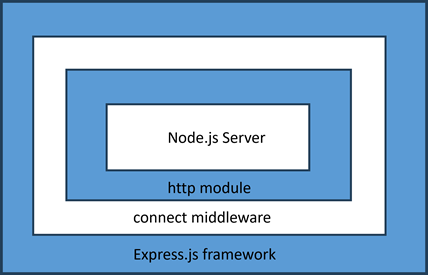
The connect middleware serves as the foundation upon which Express.js is built.d on http, one of the core modules of Node.js API.
Installing Express
The npm package repository contains the Express.js package. Let’s install the express package locally in the ExpressApp application folder.
npm init D:expressApp>
npm install express –save D:expressApp>
The aforementioned command creates a directory express inside node_modules and saves the installation locally in that directory.
Greetings, world example
This is a very simple Express application that launches a server and waits for connections on port 5000. When this app receives a request for the homepage, Hello World! is returned. It will give a 404 Not Found response for all other paths.
var express =require('express');var app =express();

app.get('/',function(req, res){
   res.send('Hello World');})var server = app.listen(5000,function(){
   console.log("Express App running at http://127.0.0.1:5000/");})
Save the above code as index.js and run it from the command-line.
D:expressApp> node index.js
Express App running at http://127.0.0.1:5000/
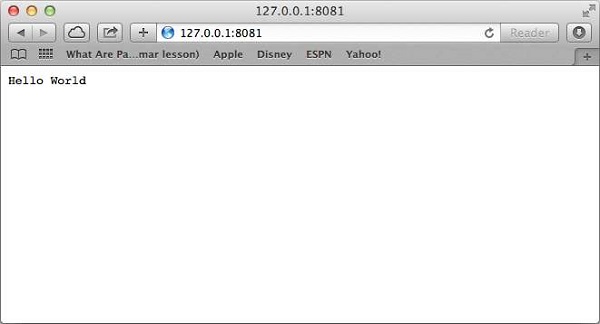
Visit http://localhost:5000/ in a browser window. It displays the Hello World message.
Application object
An object of the top level express class indicates the application object.The following statement instantiates it:
var app =express(); var express =require(‘express’);
Important functions including processing HTTP requests, displaying HTML views, and establishing middleware are all handled by the Application object.
The port and IP where the Node.js web server is configured are supplied by the application. the listen() function. It contains the createServer() method from the http module of the Node.js API.
app.listen(port, callback);
Basic Routing
The app object uses the app.get(), app.post(), app.put(), and app.delete() methods to handle the HTTP requests GET, POST, PUT, and DELETE, respectively. The NodeJS server passes the HTTP request and HTTP response objects as parameters to these methods. These methods take a string as their first parameter, which is the URL’s endpoint. These asynchronous methods transmit the request and response objects to a callback.
GET method
In the above example, we have provided a method that handles the GET request when the client visits ‘/’ endpoint.
app.get('/',function(req, res){
   res.send('Hello World');})
- The Request Object, which has properties for the query string, arguments, body, HTTP headers, and other items, represents the HTTP request.
- The response object represents the HTTP response sent by an Express application in response to an HTTP request. The send() method of the response object creates the server’s response to the client.
- It is possible to print request and response objects, which provide a multitude of details about HTTP requests and answers, including cookies, sessions, URLs, and more.
The response object also has a sendFile() method that sends the contents of a given file as the response.
res.sendFile(path)
Save the following HTML script as index.html in the root folder of the express app.
<html><body><h2 style="text-align: center;">Hello World</h2></body></html>
Change the index.js file to the code below −
var express =require('express');var app =express();var path =require('path');

app.get('/',function(req, res){
   res.sendFile(path.join(__dirname,"index.html"));})var server = app.listen(5000,function(){

   console.log("Express App running at http://127.0.0.1:5000/");})
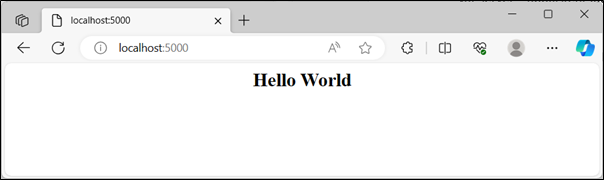
Run the above program and visit http://localhost:5000/, the browser shows Hello World message as below:
Let us use sendFile() method to display a HTML form in the index.html file.
<html><body><form action ="/process_get" method ="GET">
         First Name:<input type ="text" name ="first_name"><br>
         Last Name:<input type ="text" name ="last_name"><br><input type ="submit" value ="Submit"></form></body></html>
The above form submits the data to /process_get endpoint, with GET method. We must therefore offer an app. When the form is submitted, the get() method is triggered.
app.get('/process_get',function(req, res){// Prepare output in JSON format
   response ={first_name:req.query.first_name,last_name:req.query.last_name
   };
   console.log(response);
   res.end(JSON.stringify(response));})
The Request Object, which has properties for the query string, arguments, body, HTTP headers, and other items, represents the HTTP request.
The response object represents the HTTP response sent by an Express application in response to an HTTP request. The send() method of the response object creates the server’s response to the client.
It is possible to print request and response objects, which provide a multitude of details about HTTP requests and answers, including cookies, sessions, URLs, and more.
The complete code for index.js is as follows −
var express =require('express');var app =express();var path =require('path');

app.use(express.static('public'));

app.get('/',function(req, res){
   res.sendFile(path.join(__dirname,"index.html"));})

app.get('/process_get',function(req, res){// Prepare output in JSON format
   response ={first_name:req.query.first_name,last_name:req.query.last_name
   };
   console.log(response);
   res.end(JSON.stringify(response));})var server = app.listen(5000,function(){
   console.log("Express App running at http://127.0.0.1:5000/");})
Visit http://localhost:5000/.

Now you can enter the First and Last Name and then click submit button to see the result and it should return the following result −
{"first_name":"John","last_name":"Paul"}
POST method
The HTML form is usually used to submit data to the server with the method option set to POST, especially when delivering binary data like pictures. So, let us change the method parameter in index.html to POST, and action parameter to “process_POST”.
<html><body><form action ="/process_POST" method ="POST">
         First Name:<input type ="text" name ="first_name"><br>
         Last Name:<input type ="text" name ="last_name"><br><input type ="submit" value ="Submit"></form></body></html>
To handle the POST data, we need to install the body-parser package from npm. Use the following command.
npm install body-parser –save
This is a node.js middleware for handling JSON, Raw, Text and URL encoded form data.
The JavaScript code includes this package using the need line that follows.
var bodyParser =require('body-parser');
The urlencoded() function creates application/x-www-form-urlencoded parser
// Create application/x-www-form-urlencoded parservar urlencodedParser = bodyParser.urlencoded({extended:false})
Add the following app.post() method in the express application code to handle POST data.
app.post('/process_post', urlencodedParser,function(req, res){// Prepare output in JSON format
   response ={first_name:req.body.first_name,last_name:req.body.last_name
   };
   console.log(response);
   res.end(JSON.stringify(response));})
Here is the complete code for index.js file
var express =require('express');var app =express();var path =require('path');var bodyParser =require('body-parser');// Create application/x-www-form-urlencoded parservar urlencodedParser = bodyParser.urlencoded({extended:false})

app.use(express.static('public'));

app.get('/',function(req, res){
   res.sendFile(path.join(__dirname,"index.html"));})

app.get('/process_get',function(req, res){// Prepare output in JSON format
   response ={first_name:req.query.first_name,last_name:req.query.last_name
   };
   console.log(response);
   res.end(JSON.stringify(response));})
app.post("/process_post",)var server = app.listen(5000,function(){
   console.log("Express App running at http://127.0.0.1:5000/");})
Run index.js from command prompt and visit http://localhost:5000/.

Now you can enter the First and Last Name and then click the submit button to see the following result −
{"first_name":"John","last_name":"Paul"}
Serving Static Files
Express provides a built-in middleware express.static to serve static files, such as images, CSS, JavaScript, etc.
You simply need to pass the name of the directory where you keep your static assets, to the express.static middleware to start serving the files directly. For example, if you keep your images, CSS, and JavaScript files in a directory named public, you can do this −
app.use(express.static('public'));
We will keep a few images in public/images sub-directory as follows −
node_modules
index.js
public/public/images
public/images/logo.png
Let’s modify “Hello Word” app to add the functionality to handle static files.
var express =require('express');var app =express();
app.use(express.static('public'));

app.get('/',function(req, res){
   res.send('Hello World');})var server = app.listen(5000,function(){
   console.log("Express App running at http://127.0.0.1:5000/");})
Save the above code in a file named index.js and run it with the following command.
D:expressApp> node index.js
It might ne helpful:
Node.js Event Handling Explained with Examples
How to Ensure Data Privacy in SAP Test Environments
Frequently Asked Questions
What is Express.js and how does it help with web development?
Express.js is a popular Node.js framework that allows developers to build fast, scalable, and secure web applications. It provides a flexible and modular way to handle HTTP requests and responses, making it an ideal choice for web development. With Express.js, developers can create robust and efficient web applications quickly and easily.
Do I need to have prior knowledge of Node.js to learn Express.js?
While prior knowledge of Node.js is not strictly necessary, it is highly recommended to have a basic understanding of Node.js and JavaScript to learn Express.js effectively. Familiarity with Node.js concepts such as callbacks, promises, and async/await will help you to better understand and work with Express.js. However, many resources and tutorials are available to help beginners learn both Node.js and Express.js from scratch.
How do I set up and install Express.js for my web development project?
To set up and install Express.js, you need to have Node.js and npm (Node Package Manager) installed on your machine. You can then install Express.js using npm by running the command “npm install express” in your project directory. This will install the required dependencies and make Express.js available for use in your project.
What are some common use cases for Express.js in web development?
Express.js is commonly used for building RESTful APIs, web applications, and microservices. It is also used for creating real-time web applications, such as live updates and chat applications, using technologies like WebSockets and Socket.io. Additionally, Express.js can be used for building static websites, blogs, and e-commerce platforms.
What are some best practices for securing an Express.js web application?
Some best practices for securing an Express.js web application include validating and sanitizing user input, using HTTPS and SSL/TLS certificates, and implementing authentication and authorization mechanisms. You should also keep your dependencies and middleware up-to-date, use a secure password hashing algorithm, and implement rate limiting and IP blocking to prevent brute-force attacks. By following these best practices, you can help protect your Express.js application from common web vulnerabilities.

Leave a Reply