
Build a Node.js REST API from Scratch: Full Code and Explanation
Building REST APIs is best done with an ExpressJS-powered Node.js application. This chapter will define a REST (also known as RESTFul) API and demonstrate how to create a Node.js-based REST application using Express.js. To test the REST API, we will also employ REST clients.
Application Programming Interface is shortened to API. In general, an interface is a shared space that connects two separate and autonomous contexts. An interface that connects two software programs is called a programming interface. A web application that makes its resources available to other web or mobile applications via the Internet by defining one or more endpoints that the client apps can access to read/write operations on the host’s resources is referred to as a RESTful API.
The de facto standard for creating APIs is REST architecture, which developers prefer over other technologies like SOAP (Simple Object Access Protocol) and RPC (Remote Procedure Call).
What is REST architecture?
REpresentational State Transfer is referred to as REST. One popular software architecture approach is REST. It outlines the proper behavior of a web application’s architecture. Everything that the REST server hosts, whether it be a file, an image, or a row in a database table, is a resource with several representations in this resource-based architecture. Roy Fielding initially presented REST in 2000.
REST suggests specific architectural limitations.
- Uniform interface
- Statelessness
- Client-server
- Cacheability
- Layered system
- Code on demand
These are the advantages of REST constraints −
- Scalability
- Simplicity
- Modifiability
- Reliability
- Portability
- Visibility
REST clients use the HTTP protocol to access and modify resources that are made available by a REST server. Here, URIs or global IDs are used to identify each resource. Although JSON is the most often used representation, REST supports a variety of representations, including text, JSON, and XML, to represent a resource.
HTTP methods
Following four HTTP methods are commonly used in REST based architecture.
POST Method
A new resource has to be generated on the server, as indicated by the POST verb in the HTTP request. In the CRUD (CREATE, RETRIEVE, UPDATE, and DELETE) phrase, it is equivalent to the CREATE operation. Certain data must be supplied in the request as a data header in order to establish a new resource.
POST request examples −
HTTP POST Users at http://example.com
http://example.com/users/123 HTTPPOST
GET Method
Retrieving an existing resource from the server and returning its XML/JSON representation is the goal of the GET operation. It is equivalent to the CRUD term’s READ component.
GET request examples −
HTTPGET Users at http://example.com
HTTPGET 123 users at http://example.com
PUT Method
The client updates an existing resource using the HTTP PUT method, which is equivalent to the CRUD’s UPDATE section. The request body contains the information needed for the update.
PUT request examples −
http://example.com/users/123HTTPPUThttp://example.com/users/123/name/Ravi
DELETE Method
As the name implies, the DELETE method is used to remove one or more server resources. An HTTP response code of 200 (OK) is sent upon successful execution.
Instances of DELETE requests
HTTPDELETEhttp://example.com/users/123HTTPDELETEhttp://example.com/users/123/name/Ravi
RESTful Web Services
RESTful web services are web services built on the REST architecture. These webservices implement the REST architecture idea via HTTP methods. A Uniform Resource Identifier (URI) is often defined by a RESTful web service that offers resource representation in the form of JSON and a collection of HTTP methods.
Creating RESTful API for A Library
Consider we have a JSON based database of users having the following users in a file users.json:
{"user1":{"name":"mahesh","password":"password1","profession":"teacher","id":1},"user2":{"name":"suresh","password":"password2","profession":"librarian","id":2},"user3":{"name":"ramesh","password":"password3","profession":"clerk","id":3}}
Our API will expose the following endpoints for the clients to perform CRUD operations on the users.json file, which the collection of resources on the server.
| Sr.No. | URI | HTTP Method | POST body | Result |
|---|---|---|---|---|
| 1 | / | GET | empty | Show list of all the users. |
| 2 | / | POST | JSON String | Add details of new user. |
| 3 | /:id | DELETE | JSON String | Delete an existing user. |
| 4 | /:id | GET | empty | Show details of a user. |
| 5 | /:id | PUT | JSON String | Update an existing user |
List Users
Let’s implement the first route in our RESTful API to list all Users using the following code in a index.js file
var express =require('express');var app =express();var fs =require("fs");
app.get('/',function(req, res){
   fs.readFile( __dirname +"/"+"users.json",'utf8',function(err, data){
      res.end( data );});})var server = app.listen(5000,function(){
   console.log("Express App running at http://127.0.0.1:5000/");})
You can use a REST client like Postman or Insomnia to test this endpoint. We will utilize the insomnia client in this chapter.
Launch the Insomnia client by running index.js from the command prompt. Enter the URL http://localhost:5000/ after selecting GET methos. The Respone Panel on the right will show the list of all users from users.json.
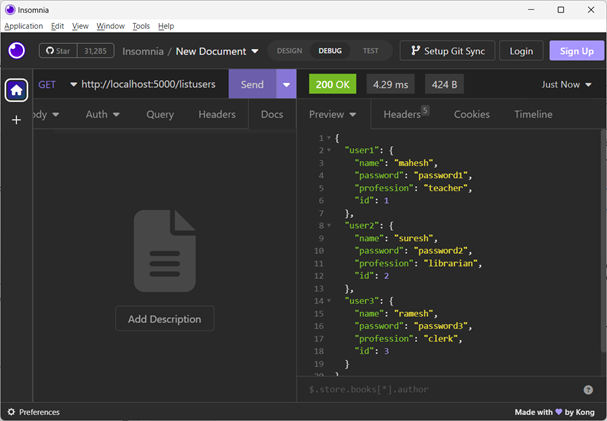
You can also use CuRL command line tool for sending HTTP requests. Open another terminal and issue a GET request for the above URL.
C:\Users\mlath>curl http://localhost:5000/{"user1":{"name":"mahesh","password":"password1","profession":"teacher","id":1},"user2":{"name":"suresh","password":"password2","profession":"librarian","id":2},"user3":{"name":"ramesh","password":"password3","profession":"clerk","id":3}}
Show Detail
Now we will implement an API endpoint /:id which will be called using user ID and it will display the detail of the corresponding user.
Add the following method in index.js file −
app.get('/:id',function(req, res){
   fs.readFile( __dirname +"/"+"users.json",'utf8',function(err, data){var users =JSON.parse( data );var user = users["user"+ req.params.id]
      res.end(JSON.stringify(user));});})
In the Insomnia interface, enter http://localhost:5000/2 and send the request.

You may also use the CuRL command as follows to display the details of user2 −
C:\Users\mlath>curl http://localhost:5000/2{"name":"suresh","password":"password2","profession":"librarian","id":2}
Add User
You can add a new user to the list by using the following API. The new user’s details are as follows. The body-parser package needs to be installed in your application folder, as previously mentioned.
var bodyParser =require('body-parser')
app.use( bodyParser.json());
app.use(bodyParser.urlencoded({extended:true}));

app.post('/',function(req, res){
   fs.readFile( __dirname +"/"+"users.json",'utf8',function(err, data){var users =JSON.parse( data );var user = req.body.user4;
      users["user"+user.id]= user
      res.end(JSON.stringify(users));});})
Set the BODY tab to JSON and add the user data in the JSON format as indicated to submit a POST request using Insomnia.
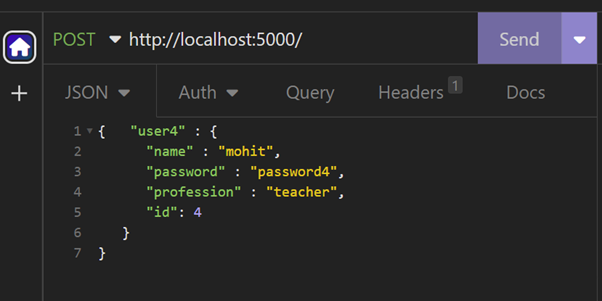
You will get a JSON data of four users (three read from the file, and one added)
{"user1":{"name":"mahesh","password":"password1","profession":"teacher","id":1},"user2":{"name":"suresh","password":"password2","profession":"librarian","id":2},"user3":{"name":"ramesh","password":"password3","profession":"clerk","id":3},"user4":{"name":"mohit","password":"password4","profession":"teacher","id":4}}
Delete user
The following function reads the ID parameter from the URL, locates the user from the list that is obtained by reading the users.json file, and the corresponding user is deleted.
app.delete('/:id',function(req, res){
   fs.readFile( __dirname +"/"+"users.json",'utf8',function(err, data){
      data =JSON.parse( data );var id ="user"+req.params.id;var user = data[id];delete data["user"+req.params.id];
      res.end(JSON.stringify(data));});})
In Insomnia, select DELETE request, type http://localhost:5000/2, then submit the request. The answer panel lists the remaining users; the user with ID=3 will be removed.

Output
{"user1":{"name":"mahesh","password":"password1","profession":"teacher","id":1},"user2":{"name":"suresh","password":"password2","profession":"librarian","id":2}}
Update user
An existing resource on the server is modified with the PUT method. The app that follows. The put() method retrieves the new information from the JSON body and the user ID to be updated from the URL.
app.put("/:id",function(req, res){
   fs.readFile( __dirname +"/"+"users.json",'utf8',function(err, data){var users =JSON.parse( data );var id ="user"+req.params.id;
      users[id]=req.body;
      res.end(JSON.stringify(users));})})
In Insomnia, set the PUT method for http://localhost:5000/2 URL.
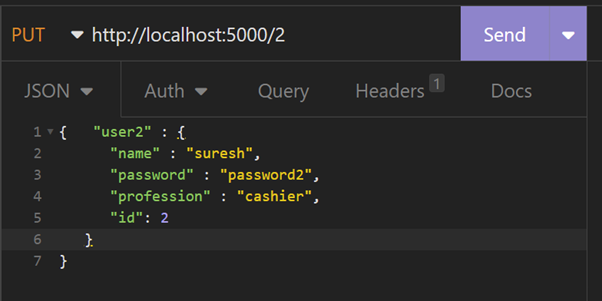
The response shows the updated details of user with ID=2
{"user1":{"name":"mahesh","password":"password1","profession":"teacher","id":1},"user2":{"name":"suresh","password":"password2","profession":"Cashier","id":2},"user3":{"name":"ramesh","password":"password3","profession":"clerk","id":3}}
Here is the complete code for the Node.js RESTFul API −
var express =require('express');var app =express();var fs =require("fs");var bodyParser =require('body-parser')
app.use( bodyParser.json());
app.use(bodyParser.urlencoded({extended:true}));


app.get('/',function(req, res){
   fs.readFile( __dirname +"/"+"users.json",'utf8',function(err, data){
      res.end( data );});})

app.get('/:id',function(req, res){
   fs.readFile( __dirname +"/"+"users.json",'utf8',function(err, data){var users =JSON.parse( data );var user = users["user"+ req.params.id]
     res.end(JSON.stringify(user));});})var bodyParser =require('body-parser')
app.use( bodyParser.json());
app.use(bodyParser.urlencoded({extended:true}));

app.post('/',function(req, res){
   fs.readFile( __dirname +"/"+"users.json",'utf8',function(err, data){var users =JSON.parse( data );var user = req.body.user4;
      users["user"+user.id]= user
      res.end(JSON.stringify(users));});})

app.delete('/:id',function(req, res){
   fs.readFile( __dirname +"/"+"users.json",'utf8',function(err, data){
      data =JSON.parse( data );var id ="user"+req.params.id;var user = data[id];delete data["user"+req.params.id];
      res.end(JSON.stringify(data));});})
app.put("/:id",function(req, res){
      fs.readFile( __dirname +"/"+"users.json",'utf8',function(err, data){var users =JSON.parse( data );var id ="user"+req.params.id;

      users[id]=req.body;
      res.end(JSON.stringify(users));})})var server = app.listen(5000,function(){
   console.log("Express App running at http://127.0.0.1:5000/");})
It might ne helpful:
A Final Roadmap to Web Development Success – 2025
How to Develop RESTful APIs with Express.js and MongoDB in 2025

Leave a Reply